# Why React16 is a blessing to React developers
Just like how people are excited about updating their mobile apps and OS, developers should also be excited to update their frameworks. The new version of the different frameworks come with new features and tricks out of the box.
Below are some of the good features you should consider when migrating your existing app to React 16 from React 15.
> *Time to say Goodbye React15 👋*
## Error Handling
*Error Handling be like :)*
React 16 introduces the new concept of an *error boundary*.
Error boundaries are React components that **catch JavaScript errors anywhere in their child component tree. They log those errors, and display a fallback UI** instead of the crashed component tree. Error boundaries catch errors during rendering, in lifecycle methods, and in constructors of the whole tree below them.
A class component becomes an error boundary if it defines a new lifecycle method called `componentDidCatch(error, info)`:
Then you can use it as a regular component.
```
```
The `componentDidCatch()` method works like a JavaScript `catch {}` block, but for components. Only class components can be error boundaries. In practice, most of the time you’ll want to declare an error boundary component once. Then you’ll use it throughout your application.
Note that **error boundaries only catch errors in the components below them in the tree**. An error boundary can’t catch an error within itself. If an error boundary fails trying to render the error message, the error will propagate to the closest error boundary above it. This, too, is similar to how `catch {}` block works in JavaScript.
Check out the live demo:
For more information on error handling, head [here](https://reactjs.org/blog/2017/07/26/error-handling-in-react-16.html).
## New render return types: fragments and strings
Get rid of wrapping the component in a div while rendering.
You can now return an array of elements from a component’s `render` method. Like with other arrays, you’ll need to add a key to each element to avoid the key warning:
```
render() {
// No need to wrap list items in an extra element!
return [
// Don't forget the keys :)
First item,
Second item,
Third item,
];
}
```
[Starting with React 16.2.0](https://reactjs.org/blog/2017/11/28/react-v16.2.0-fragment-support.html), it has support for a special fragment syntax to JSX that doesn’t require keys.
Support for returning strings :
```
render() {
return 'Look ma, no spans!';
}
```
## Portals
Portals provide a first-class way to render children into a DOM node that exists outside the DOM hierarchy of the parent component.
```
ReactDOM.createPortal(child, container)
```
The first argument (`child`) is any [renderable React child](https://reactjs.org/docs/react-component.html#render), such as an element, string, or fragment. The second argument (`container`) is a DOM element.
### **How to use it**
When you return an element from a component’s render method, it’s mounted into the DOM as a child of the nearest parent node:
```
render() {
// React mounts a new div and renders the children into it
return (
{this.props.children}
);
}
```
Sometimes it’s useful to insert a child into a different location in the DOM:
```
render() {
// React does *not* create a new div. It renders the children into `domNode`.
// `domNode` is any valid DOM node, regardless of its location in the DOM.
return ReactDOM.createPortal(
this.props.children,
domNode
);
}
```
A typical use case for portals is when a parent component has an `overflow: hidden` or `z-index` style, but you need the child to visually “break out” of its container. For example, dialogs, hovercards, and tooltips.
## Custom DOM Attribute

React15 used to ignore any unknown DOM attributes. It would just skip them since React didn’t recognize it.
```
// Your code:
```
Would render an empty div to the DOM with React 15:
```
// React 15 output:
```
In React16, the output will be the following (*custom attributes will be shown and not be ignored at all*):
```
// React 16 output:
```
## Avoid Re-render with setting NULL in state

With React16 you can prevent state updates and re-renders right from `setState()`. You just need to have your function return `null`.
```
const MAX_PIZZAS = 20;
function addAnotherPizza(state, props) {
// Stop updates and re-renders if I've had enough pizzas.
if (state.pizza === MAX_PIZZAS) {
return null;
}
// If not, keep the pizzas coming! :D
return {
pizza: state.pizza + 1,
}
}
this.setState(addAnotherPizza);
```
Read more [here](https://x-team.com/blog/react-render-setstate/).
## Creating Refs
Creating refs with React16 is now much easier. Why you need to use refs:
* Managing focus, text selection, or media playback.
* Triggering imperative animations.
* Integrating with third-party DOM libraries.
Refs are created using `React.createRef()` and are attached to React elements via the `ref`attribute. Refs are commonly assigned to an instance property when a component is constructed so they can be referenced throughout the component.
```
class MyComponent extends React.Component {
constructor(props) {
super(props);
this.myRef = React.createRef();
}
render() {
return ;
}
}
```
### **Accessing Refs**
When a ref is passed to an element in `render`, a reference to the node becomes accessible at the `current` attribute of the ref.
```
const node = this.myRef.current;
```
The value of the ref differs depending on the type of the node:
* When the `ref` attribute is used on an HTML element, the `ref` created in the constructor with `React.createRef()` receives the underlying DOM element as its `current` property.
* When the `ref` attribute is used on a custom class component, the `ref` object receives the mounted instance of the component as its `current`.
* **You may not use the `ref` attribute on functional components** because they don’t have instances.
## Context API
Context provides a way to pass data through the component tree without having to pass props down manually at every level.
### `React.createContext`
```
const {Provider, Consumer} = React.createContext(defaultValue);
```
Creates a `{ Provider, Consumer }` pair. When React renders a context `Consumer`, it will read the current context value from the closest matching `Provider` above it in the tree.
The `defaultValue` argument is **only** used by a Consumer when it does not have a matching Provider above it in the tree. This can be helpful for testing components in isolation without wrapping them. Note: passing `undefined` as a Provider value does not cause Consumers to use `defaultValue`.
### `Provider`
```
```
A React component that allows Consumers to subscribe to context changes.
Accepts a `value` prop to be passed to Consumers that are descendants of this Provider. One Provider can be connected to many Consumers. Providers can be nested to override values deeper within the tree.
### `Consumer`
```
{value => /* render something based on the context value */}
```
A React component that subscribes to context changes.
Requires a [function as a child](https://reactjs.org/docs/render-props.html#using-props-other-than-render). The function receives the current context value and returns a React node. The `value` argument passed to the function will be equal to the `value` prop of the closest Provider for this context above in the tree. If there is no Provider for this context above, the `value` argument will be equal to the `defaultValue` that was passed to `createContext()`.
## `static getDerivedStateFromProps()`
`getDerivedStateFromProps` is invoked right before calling the render method. Both on the initial mount and on subsequent updates. It should return an object to update the state, or null to update nothing.
This method exists for [rare use cases](https://reactjs.org/blog/2018/06/07/you-probably-dont-need-derived-state.html#when-to-use-derived-state) where the state depends on changes in props over time. For example, it might be handy for implementing a `<Transition>` component that compares its previous and next children to decide which of them to animate in and out.
Deriving state leads to verbose code and makes your components difficult to think about.
[Make sure you’re familiar with simpler alternatives:](https://reactjs.org/blog/2018/06/07/you-probably-dont-need-derived-state.html)
* If you need to **perform a side effect** (for example, data fetching or an animation) in response to a change in props, use `[componentDidUpdate`](https://reactjs.org/docs/react-component.html#componentdidupdate) lifecycle instead.
* If you want to **re-compute some data only when a prop changes**, [use a memoization helper instead](https://reactjs.org/blog/2018/06/07/you-probably-dont-need-derived-state.html#what-about-memoization).
* If you want to **“reset” some state when a prop changes**, consider either making a component [fully controlled](https://reactjs.org/blog/2018/06/07/you-probably-dont-need-derived-state.html#recommendation-fully-controlled-component) or [fully uncontrolled with a `key`](https://reactjs.org/blog/2018/06/07/you-probably-dont-need-derived-state.html#recommendation-fully-uncontrolled-component-with-a-key) instead.
This method doesn’t have access to the component instance. If you’d like, you can reuse some code between `getDerivedStateFromProps()` and the other class methods by extracting pure functions of the component props and state outside the class definition.
Note that this method is fired on *every* render, regardless of the cause. This is in contrast to `UNSAFE_componentWillReceiveProps`. It only fires when the parent causes a re-render and not as a result of a local `setState`.
We compare `nextProps.someValue` with `this.props.someValue.` If both are different then we perform some operation, `setState`
```
static getDerivedStateFromProps(nextProps, prevState){ if(nextProps.someValue!==prevState.someValue){
return { someState: nextProps.someValue};
} else return null;}
```
It receives two params `nextProps` and `prevState`. As mentioned previously, you cannot access `this` inside this method. You’ll have to store the props in the state to compare the `nextProps` with previous props. In above code `nextProps` and `prevState` are compared. If both are different then an object will be returned to update the state. Otherwise `null` will be returned indicating state update not required. If state changes then `componentDidUpdate` is called where we can perform the desired operations as we did in `componentWillReceiveProps`.
## Bonus: React Lifecycle events
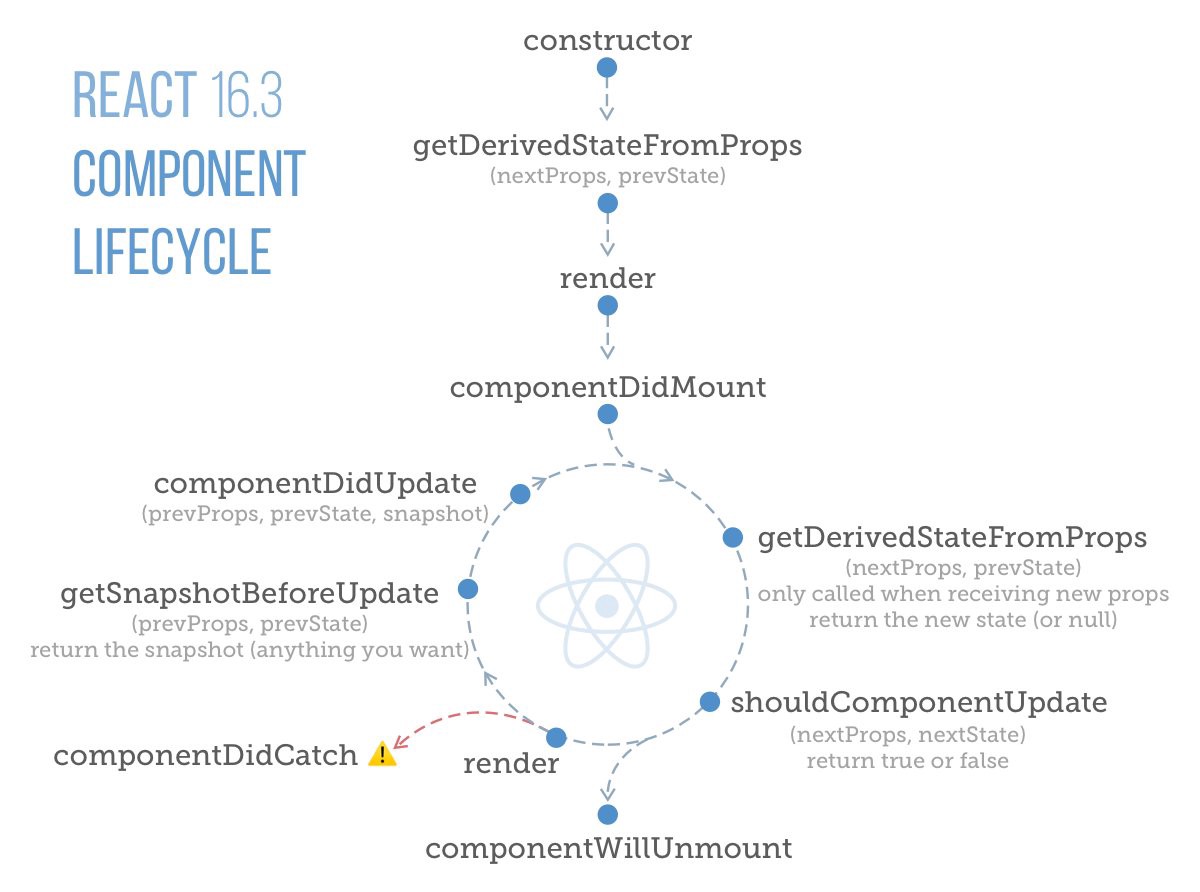
Lifecycle credits — [https://twitter.com/dceddia](https://twitter.com/dceddia)
Well these are some of the features that you should definitely try while working with React16!
Happy coding 💻 😀